Welcome To
MyJonBoat.com
"How To" eBooks
*Online Since 1998
Browse Our Site:
Jon Boat Videos
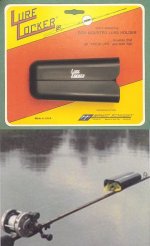
LURE LOCKERS: 
Podcast
From Ray
About
The
Jon Boat To Bass Boat Book
Mouse Over Links For Info
Jon Boat "Hall Of Fame"
A Tackle Accessory
You Won't Find
Anywhere Else!

|
You'll Save BIG On A Custom Bass Boat
In More Ways Than One |
Virus Info:
Are These Files Safe To Download?...YOU BET!

I included this page on my web-site to help clarify any misinformation you may have heard about viruses. Again, I assert that my files are perfectly safe to download and have been since 1998! Please call my toll-free number with any questions: 1-877-968-6878.
The program I use to create my e-books produces an executable file (.exe). This is great for e-books because makes it possible to have stand-alone e-books that can run themselves, just like a web-site!
How Are Viruses Sent Over The Internet?
This info below is taken from the best Computer Tips newsletter on the web today. I have been a subscriber for years. To get your free subscription, go to the link at the bottom of this page. Its fast, easy, and you'll learn tons of good things about your 'puter from now on!
Security Tip - Be Careful with Attachments:
Well, it's been another big year for hackers. There have been a number of
really bad viruses just within the past 6 months. We've seen the W32.Beagle,
W32.Netsky, MyDoom, and so on and so on. Most of these viruses were transported
or replicated from pc to pc using email attachments. These are easy to spot if
you're paying attention, simply because they are usually executable files,
but not always.
Some attachments contain Macros (simple programs that run within other
programs-all the titles in Microsoft Office use macros). If you're not that
familiar with spotting file extensions, don't worry, that's what I'm here to
talk about today. If your a little hazy on the whole "file extension" thing
then let's spend a few moments explaining it.
File extensions are what tell the program how to treat a particular piece of
data. For example, most people are somewhat familiar with .doc or a .txt file
extensions these are both text documents and when the user opens this file the
Operating System looks at this extension and then knows how to open it.
Hackers try to use some sort of eye-grabbing ploy to get you to open their
email and activate the virus which is always an attachment. Most Anti-virus
nowadays stop, or at least warn, you of these high risk attachments and even
take measures to protect you. However, on the average 10-15 new viruses are
created every day and I personally wouldn't count on any program to 100%
protect my pc. That's why I scrutinize any email-if I wasn't expecting an
attachment, I won't open it until I had a chance to talk to the sender.
Some of the more common file
types used
to hide viruses
include:
.scr - Windows Screen Saver - USE CAUTION if you receive a screen saver
via email. They can contain worms or viruses
.pif - DO NOT OPEN! This is most likely a virus. Clicking it will run a
program or code that can mess up your computer.
.exe - executable file - a program that can contain a virus, trojan horse, or
worm (except for e-books from "MyJonBoat.Com"!)
.pps - MS PowerPoint (can contain macro virus)
.zip - Zip (compressed) file
.vbs - Visual Basic script
.bat - Executable MS-DOS batch file
.com - DOS executable command
.asp - active server page - internet script
.doc - Word document (can contain macro virus)
.xls - Excel file (can contain macro virus)
This is in no way a complete list. Just because an attachment may have one
of these extensions doesn't mean that it is a virus, but it should send up
warning flags. Hackers use clever subject lines, and viruses can appear to
come from a friend so keep on your toes and don't fall victim to their
deceptive traps. Scan those attachments and verify with the sender before
opening.
Stay safe out there,
Chad Stelnicki
Magness Enterprises
23853 C.R. 114
Iola, Texas 77861
1-877-968-6878
Website Design By
Magness Enterprises
Home
-
About This Jon Boat
-
Conversion Cost -
eBook Download Info
-
eBook CD Info
Printed Book+CD Info
-
Jon Boat Accessories
-
Lure Lockers On Video
Emu Oil For Sunburn -
Jon Boat Links & More
-
Prices
& Extras Info
V-Bottom Jon Boats
-
Customer Kudos
-
Bassin' Buddies e-Greet
Order
-
Free Preview eBook
Info
-
Jon Boat Hall Of Fame
Used Jon Boats -
Aluminum Jon Boats -
Jon Fishing Boat
About Us - Privacy - Tackle
- Jon Boat Videos -
Site
Map